


A configurable web-based LIMS with AI, for diverse laboratory applications

One LIMS for the whole journey of a sample.

From quotation to retained sample: eLABoraNET connects order, sampling, analysis, report and billing, with especially comprehensive functions for environmental testing and microbiology, and AI in production use.

A selection of our references

  • Enel Green Power
  • ALI Lab
  • iConLab
  • Micral
  • TLAB
Since 2012
in productive use
4
countries with installations
57
customers
1000+
users

Certified management systems: ISO 9001 · ISO/IEC 27001 · ISO 14001 · ISO 45001. ISO/IEC 42001: certification in progress. More about our certifications

AI in eLABoraNET

AI where it saves laboratory work.

Three AI capabilities are in production use, two more are on the roadmap.

AI management system: ISO/IEC 42001 certification in progress

AI providers only with EU hosting and zero data retention

In use

On the roadmap

  • Laboratory order from email, slip or PDF

    An order email, an order slip or a PDF will become a complete laboratory order.

  • MCP server

    Through the open Model Context Protocol, eLABoraNET data and functions will become usable by AI assistants.

All AI capabilities at a glance

Example order: drinking water

Follow one sample.

A drinking-water order, from the first enquiry to the retained sample. The label travels with you and shows who does what.

01Enquiry & order

“What do we need to test in our drinking water?”

An operator contacts the laboratory. Together, they establish the question, sampling points and analytical scope. The process begins with advice and a tailored quotation.

  1. EnquiryThe operator asks the question.
  2. QuotationThe lab team defines the scope.
  3. Order TW-0241Services and analyses become one shared order.

Customer master data, service items and the analytical scope stay in the same order context, for analysis and billing alike.

02In the field

The sample journey starts before laboratory receipt.

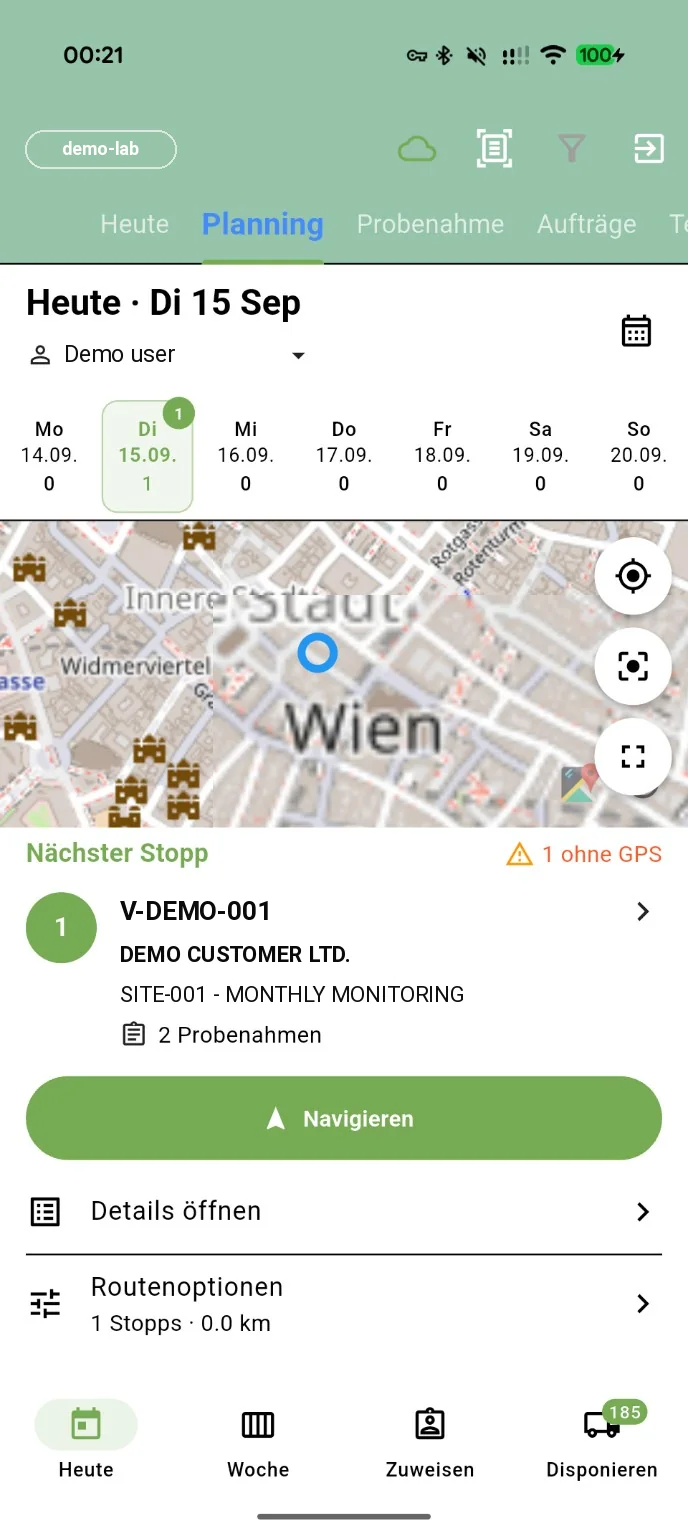
A qualified person takes the sample, in your own team or at an external sampling organisation. They record sampling points, measurements such as the temperature, photographs and signatures in the sampling app, including offline. The data is then transferred to the LIMS.

Sampling app: daily plan with map and next stop
  • Daily & weekly planning
  • Sampling points
  • Barcode access
  • Photos & signatures
  • Capture offline, transfer later
03In the laboratory

Three paths to a result. One sample context.

The sample reaches the analysis. Consumables, QC standards and equipment records belong to the same context. Results arrive from an instrument, from external PDF reports or by direct entry.

  1. InterfaceFrom the instrument to the LIMS.
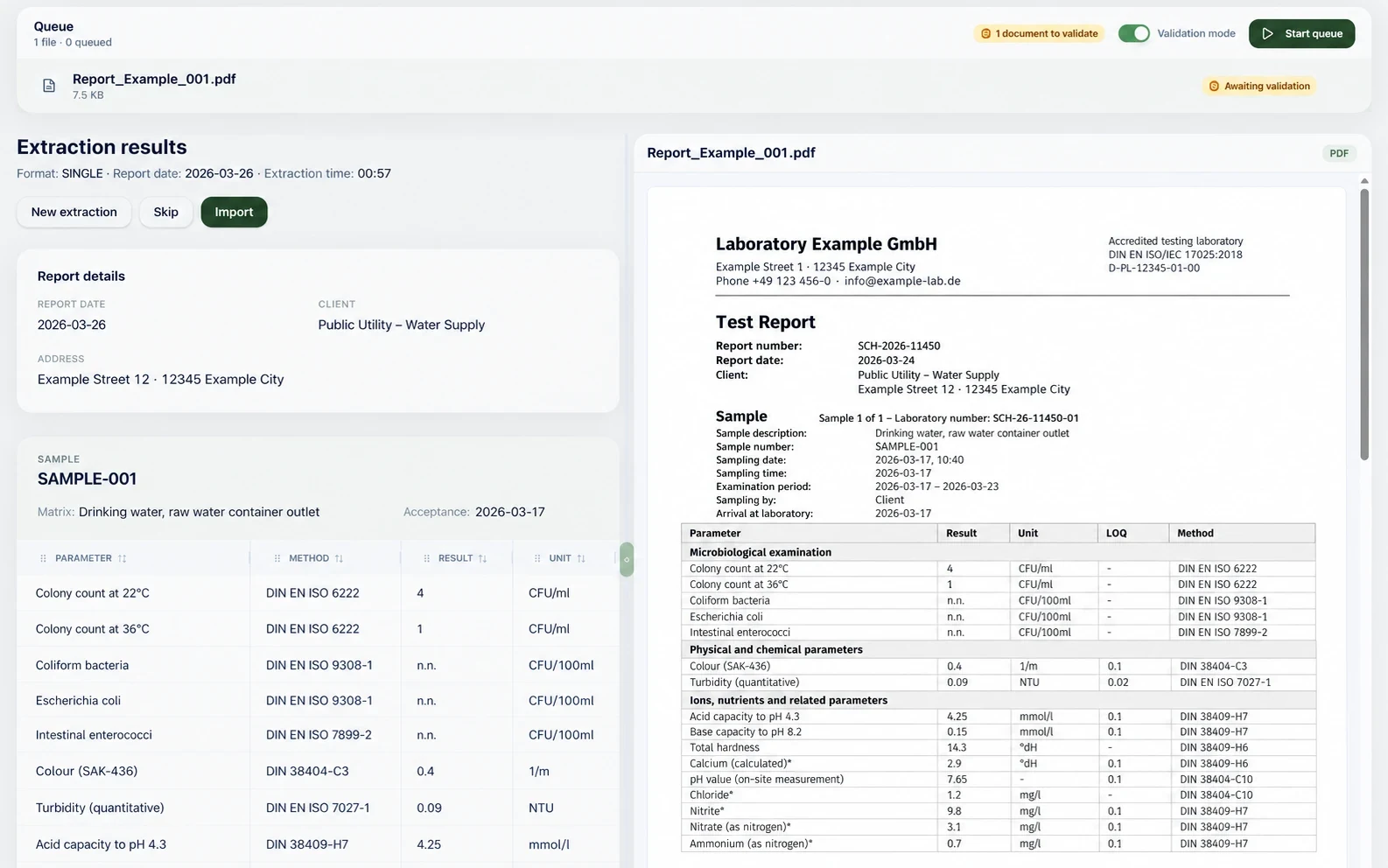
  2. AI result importValues from external PDF reports are assigned to existing samples and pending analyses. No configuration, no manual mapping: load it in, confirm, done.
    AI result import with example data: on the left the values extracted from a PDF (parameter, method, result, unit), on the right the example report PDF; at the top the queue in validation mode with Skip and Import buttons
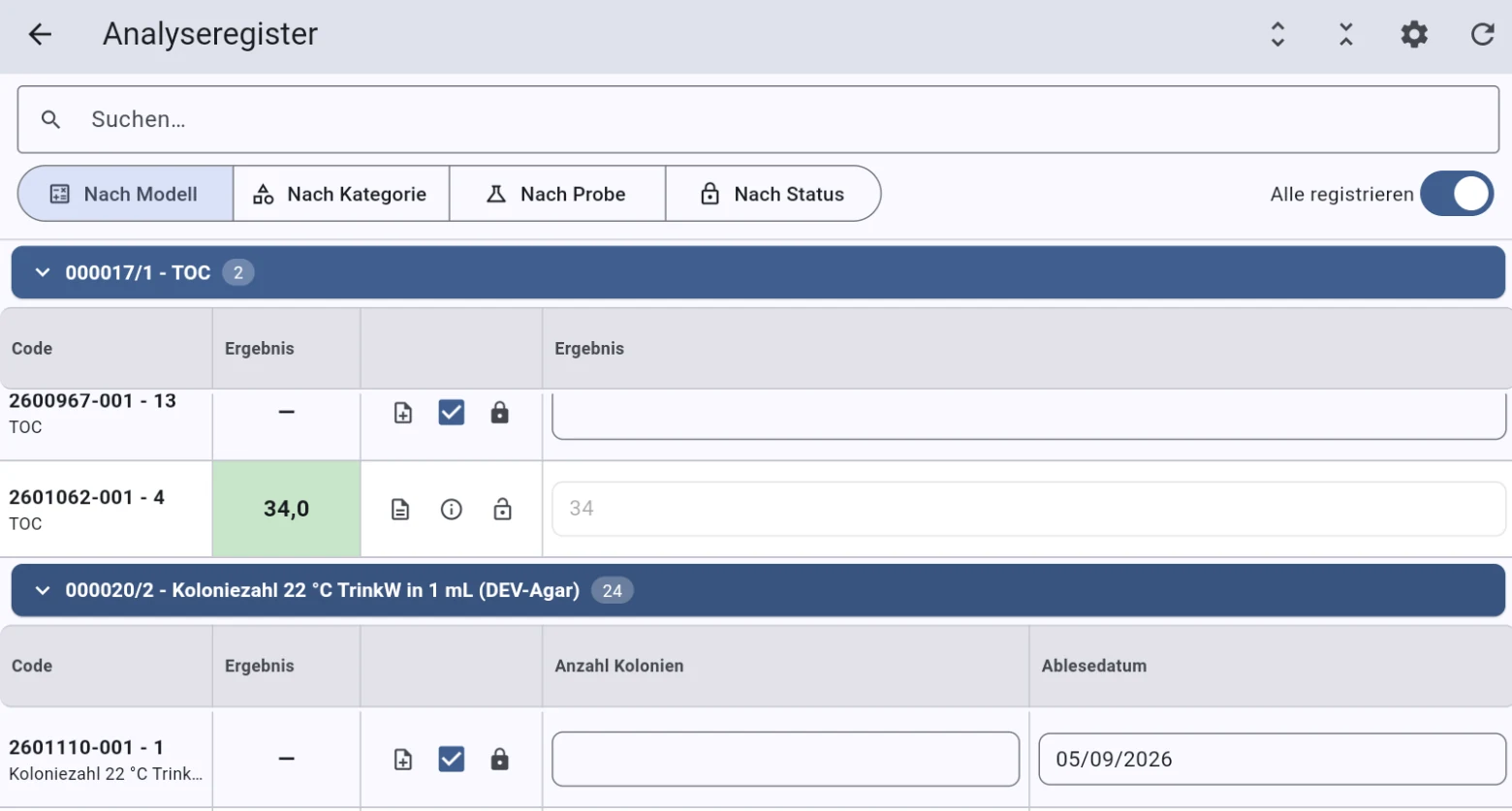
  3. Android appCapture results at the workstation, with an app built for this step.
    Android result entry, analysis register: search field, views by model, category, sample and status, below them grouped analyses (TOC, colony count 22 °C) with input fields for the results
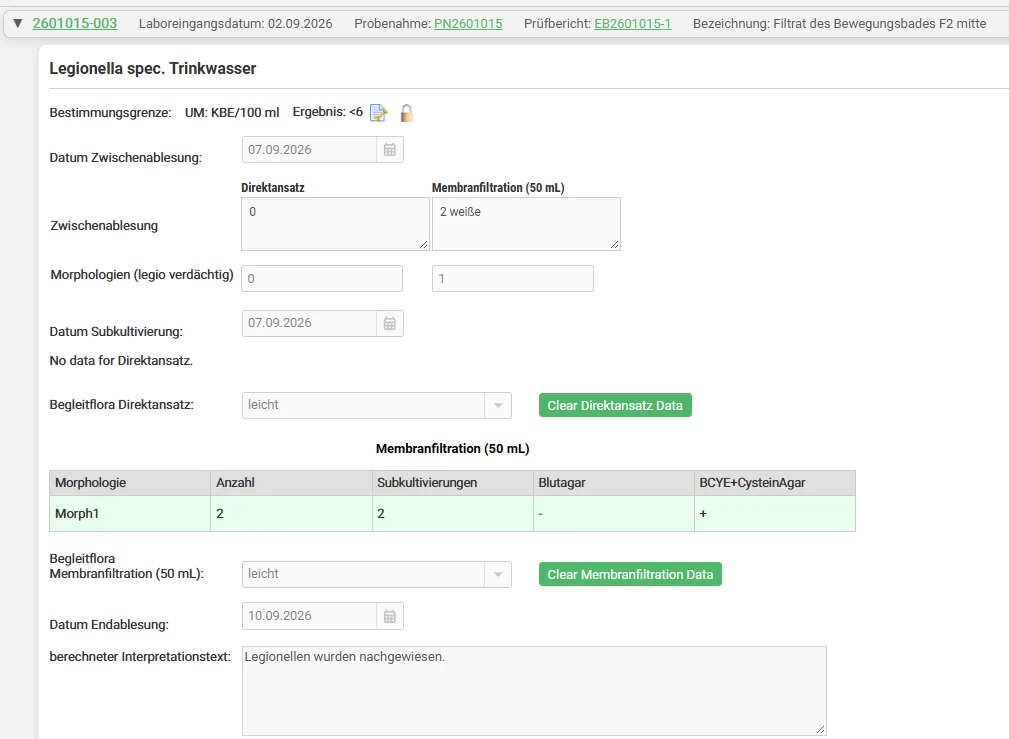
Entry screen Legionella spec. drinking water: quantification limit and result, intermediate reading for direct plating and membrane filtration, morphologies, subculture table for blood agar and BCYE-cysteine agar, final reading date and calculated interpretation text
04The overview

What is complete? What needs attention?

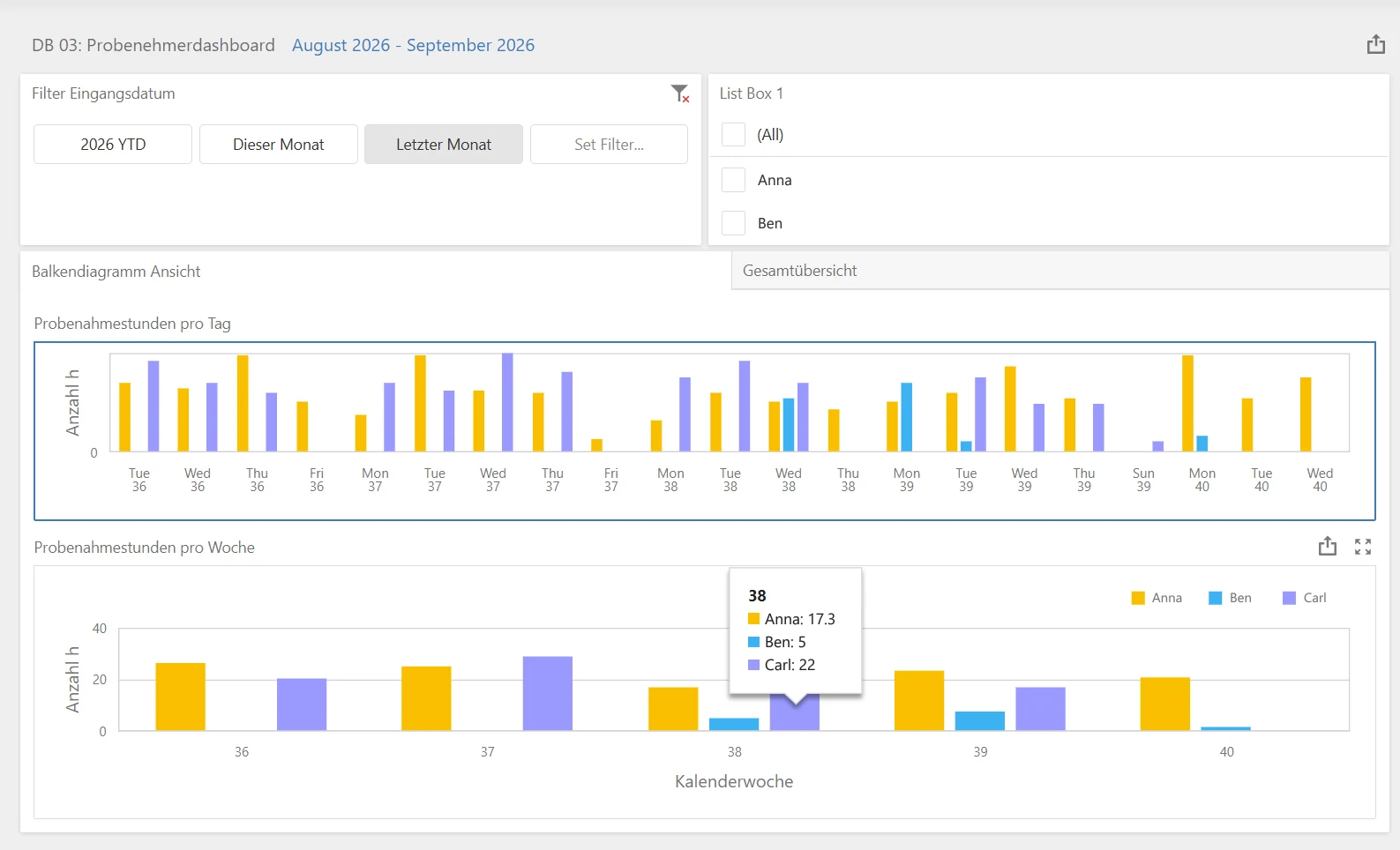
In dashboards, laboratory managers visualise all of the laboratory’s data: sample status, orders and turnaround times as well as sampling, inventory, equipment and billing. You can put questions to a dashboard in natural language and generate new dashboards with AI assistance.

Sampler dashboard with a date filter, a person list and two bar charts: sampling hours per day and per week, split by three people, with a pop-up for calendar week 38
05Completion

The report is not the end of the sample.

Results become a report, services become an invoice. And the sample itself stays accounted for.

The answer

The sample becomes an answer for the customer.

Results become a laboratory report, with digital signature workflows. Customers view their samples and reports in the customer portal; quotations and orders are still handled by the laboratory.

  • Digital signature
  • Customer portal for viewing
  • Multilingual reports

The invoice

The laboratory service becomes an e-invoice.

Commercial processing follows the analytical work. eLABoraNET supports German e-invoicing in the XRechnung and ZUGFeRD formats. Invoice data goes to accounting automatically. Existing ERP systems can be integrated.

  • XRechnung
  • ZUGFeRD
  • Accounting interface, e.g. SAP, DATEV, Lexware or Microsoft Dynamics 365

The retained sample

And what happens to the sample?

Where a sample is retained, it stays accounted for in retained-sample management. At disposal, the discard app helps: the sample is identified by barcode and the disposal step is completed. An invoice is not a prerequisite.

  • Retained-sample management
  • Discard app
  • Barcode

Complementary products

Focused additions to the laboratory core.

eLABoraSOILAvailable

Import and map analytical values for soil and mineral waste, then assess them against versioned rule catalogues.

Learn more
eLABoraCLOCKAvailable

Working time, absences and shifts across companies and locations. Web and mobile entry plus an NFC/QR kiosk with an offline queue.

Learn more

Next step

Which sample should we follow for you?

Tell us your use case. We show you the journey of your sample in eLABoraNET, with your workflows instead of a standard demo.

What is it about?

We use your details only to answer your request. More in the privacy statement.