
Results · AI import
AI result import: results from PDF reports without retyping
When results arrive as a PDF from a partner laboratory, the AI import reads the report values and assigns them to existing samples and pending analyses. No configuration, no manual mapping: load it in, confirm, done. The AI import is in production use.
At a glance
- What for
- Results that exist as the PDF report of another laboratory, for example from a partner laboratory.
- What happens
- The report values are assigned to existing samples and pending analyses.
- Configuration
- No configuration and no manual mapping: load it in, confirm, done.
- Check
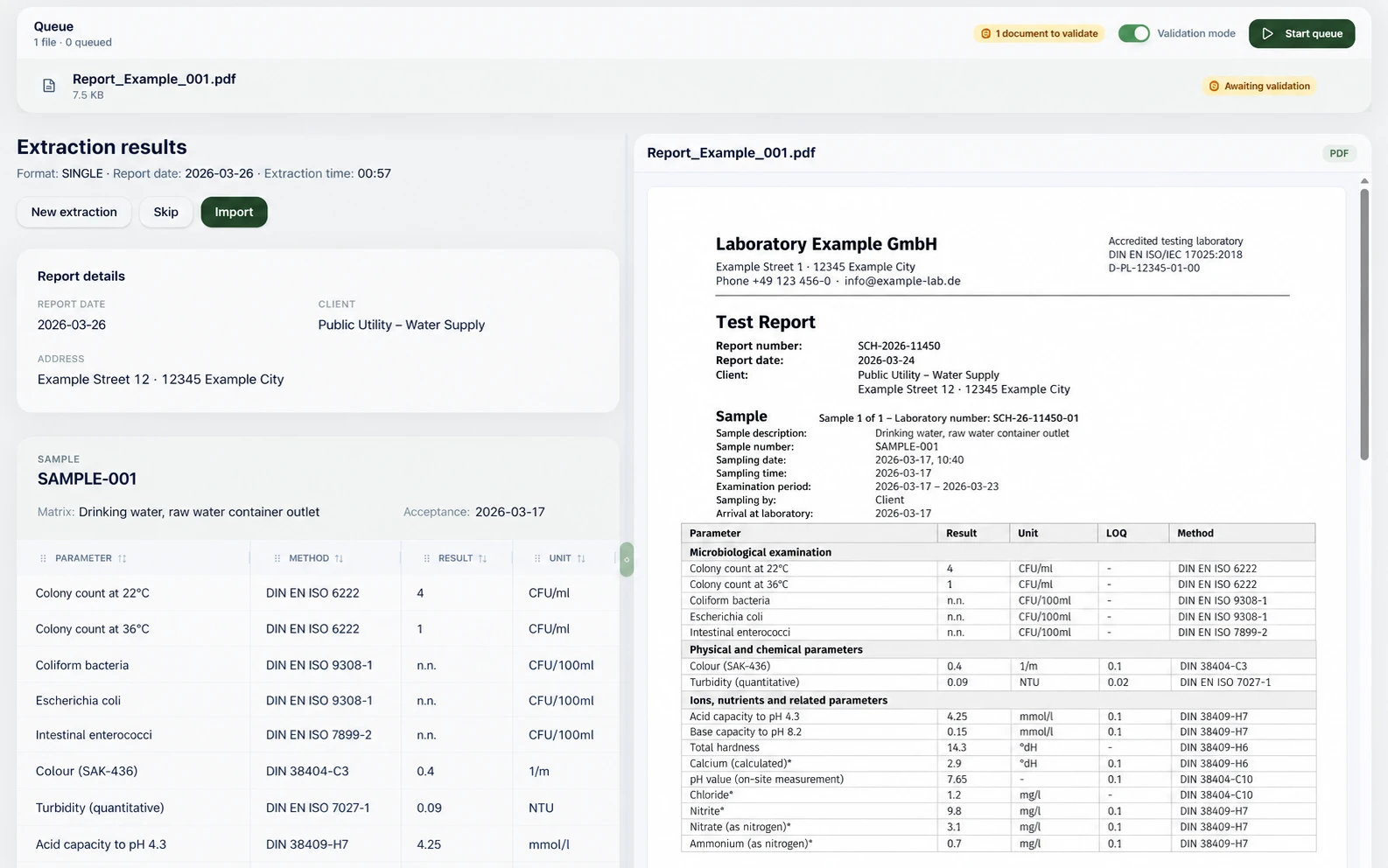
- In validation mode you see the extracted values next to the PDF and confirm with “Import”. “Skip” leaves a report out.
- Status
- In production use.
- Data
- Processed by AI providers hosted in the EU with zero data retention: your data is not stored afterwards.
The problem: results that exist only as a PDF
Not every result comes from your own laboratory. Partner laboratories and other contractors often deliver their results as a PDF test report. Retyping the values takes time, and every transfer is a source of error.
How the AI import works
- 01
Load in the PDF
You load the partner laboratory’s report into the import.
- 02
Read the values
The AI import reads the report values from the PDF: parameter, method, result and unit.
- 03
Assign
The values are assigned to existing samples and pending analyses.
- 04
Confirm
In validation mode you check the extracted values next to the PDF and confirm the import, or you leave the report out.
No configuration, no manual mapping
The AI import needs no configuration and no manual mapping. You load the report in, confirm the values and you are done.
You see what was read before it is taken over
In validation mode the extracted values (parameter, method, result, unit) sit next to the PDF of the report. You see at a glance what was read and decide whether to import the report or leave it out.
Where the AI import fits in the process
Results reach eLABoraNET in three ways: through the interface to the instrument, through the AI import of external PDF reports, or through the Android result entry at the workstation. The AI import is part of the results module.
FAQ
Frequently asked questions
What is the AI import?
A function of the results module. It reads the values from PDF reports of external laboratories and assigns them to existing samples and pending analyses.
Do I have to configure the AI import?
No. There is no configuration and no manual mapping: load it in, confirm, done.
Do I have to confirm the values?
Yes. After loading, you confirm the extracted values in validation mode, next to the PDF of the report.
Which details does the AI import read?
For each value the parameter, method, result and unit, as the figure shows.
Is the AI import already in use?
Yes, it is in production use.
Where does the report data go?
To AI providers hosted in the EU with zero data retention. The data is not stored after processing.
Read on
Next step
Which sample should we follow for you?
Tell us your use case. We show you the journey of your sample in eLABoraNET, with your workflows instead of a standard demo.