
Microbiology
Microbiology entry screens that need no configuration
Microbiology in eLABoraNET needs no screen configuration: you create the analysis from a template and mainly enter the internal designation of the model. Quantification limits, fields and formulas are predefined, and workarounds are not needed. You record colony counts and Legionella where the sample already is, in the context of order, sampling and report.
At a glance
- Screens
- Colony count with dilution steps and Legionella with direct plating and membrane filtration.
- Configuration
- Ready-made screens: quantification limits, fields and formulas are predefined. Create the analysis from a template, enter the internal designation of the model, start.
- Context
- Sample, sampling and report are linked at the top of the screen.
- Entry
- At the workstation in the browser. Colony counts also in the Android result entry.
- Traceable
- Reading dates, remarks and the calculated interpretation text stay with the analysis.
What “no configuration” means
Microbiological work follows fixed steps: count, read, subculture, assess. eLABoraNET brings ready-made screens for that. You do not configure formulas and you do not build workarounds into the entry screens.
This is how you start: you create the analysis from a template and mainly enter the internal designation of the model. Quantification limits, fields and formulas are predefined. Your laboratory maintains its own accreditation status.
Legionella: direct plating and membrane filtration in one screen
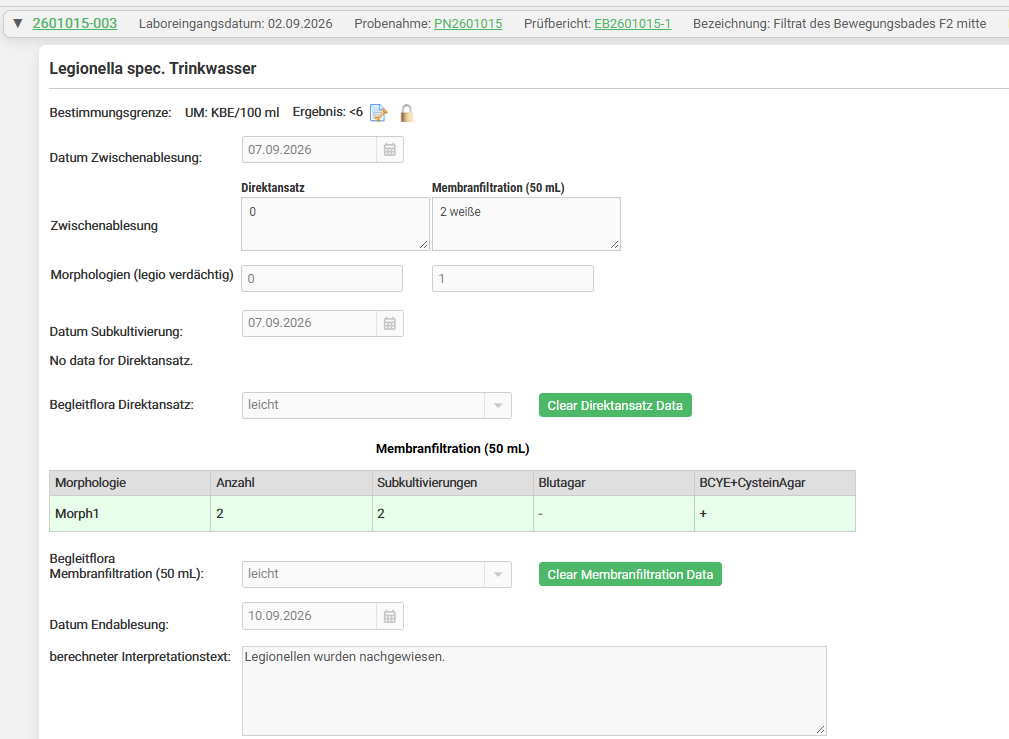
The screen for Legionella in drinking water walks through the sequence a laboratory follows anyway:
- Quantification limit, unit (CFU/100 ml) and result are at the top, above them the links to sample, sampling and report.
- Direct plating and membrane filtration sit side by side, each with an intermediate reading and its date.
- You record suspect morphologies with their count and enter the subculture on blood agar and BCYE-cysteine agar for each morphology.
- You note the accompanying flora for each approach, and the final reading with its date.
- From your entries the screen calculates an interpretation text.
Colony count: dilution steps classified automatically
For the colony count you enter the counted colonies for each dilution step. The screen classifies every step automatically: countable, below or above the countable range. Countable steps are preselected and the result follows from them. You can include or exclude single steps with a reason. Medium, reading date, accompanying flora and remarks are kept with the same analysis.
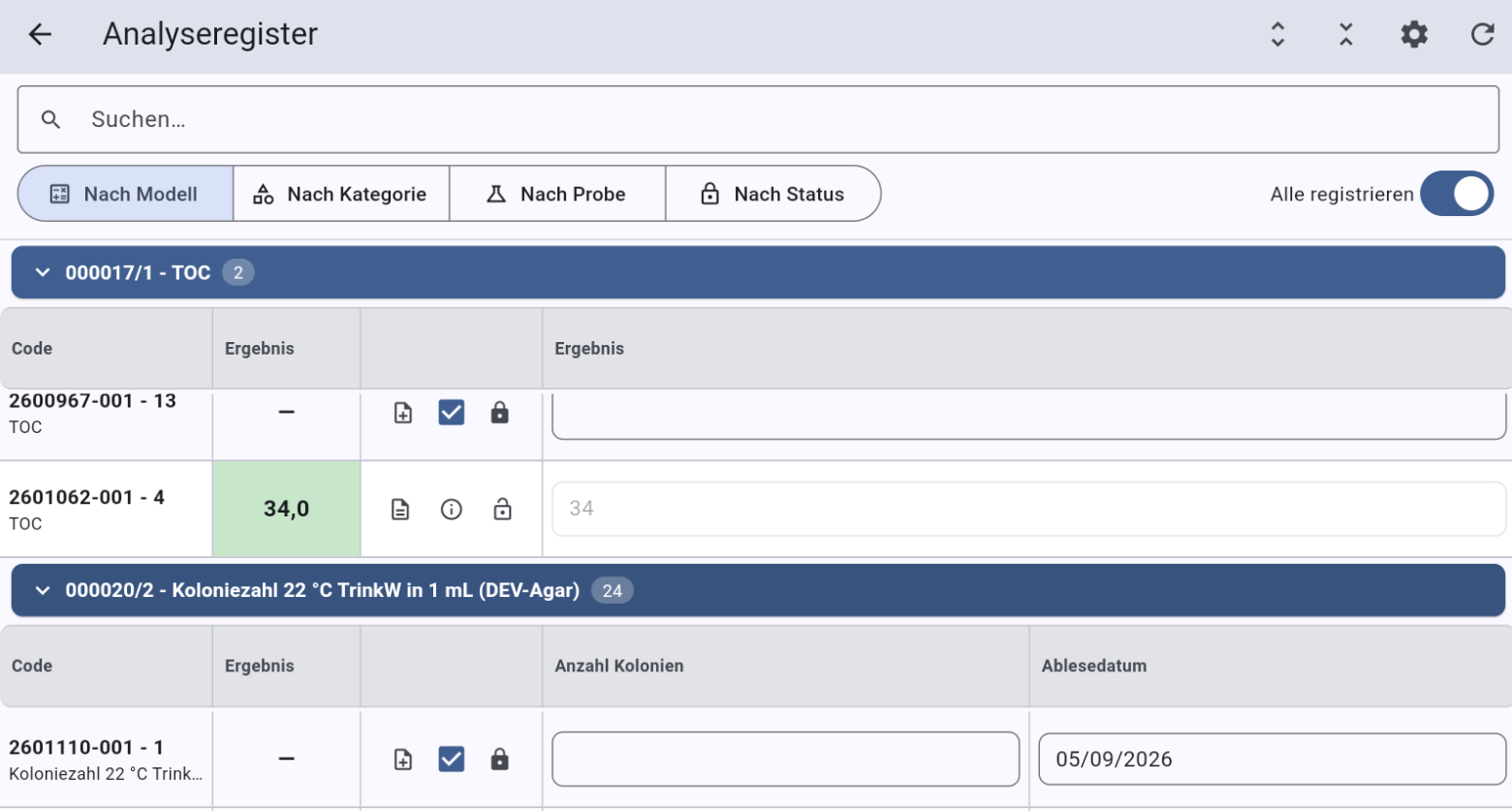
In the Android result entry you record colony counts with the number and the reading date right at the workstation. The analyses are grouped by method there.
From result to report
Microbiology results flow into the same report as every other analysis of the sample, with a digital signature workflow. See also the reports module.
FAQ
Frequently asked questions
Do I have to configure the microbiology screens?
No. Quantification limits, fields and formulas are predefined. You create the analysis from a template and mainly enter the internal designation of the model.
Which analyses have a screen?
This version covers the colony count and Legionella. How further microbiological parameters are handled in eLABoraNET, we clarify with you.
How are dilution steps assessed?
Each step is classified automatically from the colony count entered: countable, below or above the countable range. The screen preselects the countable steps. You can include or exclude a step with a reason.
Can I record results on an Android device?
Yes. The Android result entry shows analyses grouped by method, with fields for the number of colonies and the reading date.
How does this connect to the report?
The results go into the report of the sample. In the screen you see sample, sampling and report linked.
Read on
Next step
Which sample should we follow for you?
Tell us your use case. We show you the journey of your sample in eLABoraNET, with your workflows instead of a standard demo.